Notifications
Open Sub Accounts → select a location → Notifications tab.
Each sub-account can configure email notifications for operational events your organization enables (alerts about sessions, billing, or other signals — exact triggers depend on product configuration).
Where to configure
- Open the Notifications tab on the sub-account.
- Enter the notification email (or confirm the inherited address).
- Turn notifications on or off with the toggle shown.
- Use send test (or equivalent) to verify deliverability when the UI offers it.
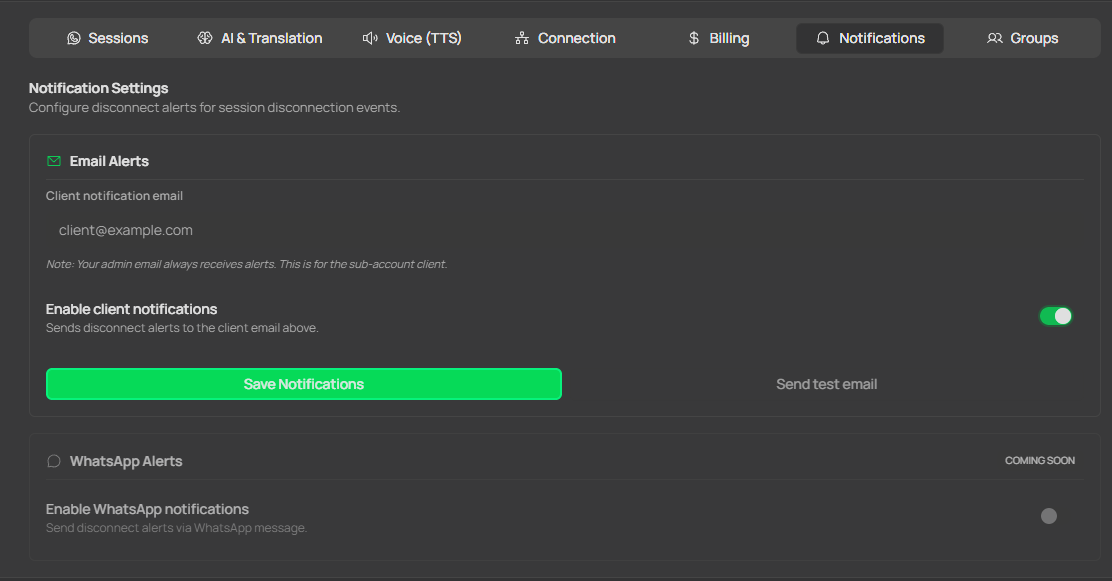
Sub-account Notifications tab: alert email, notification toggle, and test button.
Good practices
- Use a role inbox (
alerts@…) rather than a personal email when the whole team should see failures. - Whitelist the sender domain so messages do not land in spam.
- After changing SMTP-related infrastructure at your agency, run a new test from this tab.
Related
- Onboarding — baseline setup before enabling operational notifications.
- Frequently asked questions — “Email notifications do not arrive”.