Billing
Open Sub Accounts → select a location → Billing tab.
Billing in WhatGHL usually combines price per sub-account, extra sessions, and a payment mode that defines who pays whom. Exact amounts are set by your agency; here we explain what you see on the sub-account Billing tab.
Billing modes (concepts)
| Mode | Typical meaning |
|---|---|
| Direct Pay | The sub-account (or end client) pays directly through checkout or the integrated payment method. |
| Agency Managed | The agency bills the client and manages settlement with the platform. |
| Agency Pays | The agency pays for that sub-account (internal accounts, partners, promotions). |
| Platform Managed | Billing orchestration at platform level, when your organization enables it. |
Agency defaults may apply; this tab can show overrides when the UI lets you edit them.
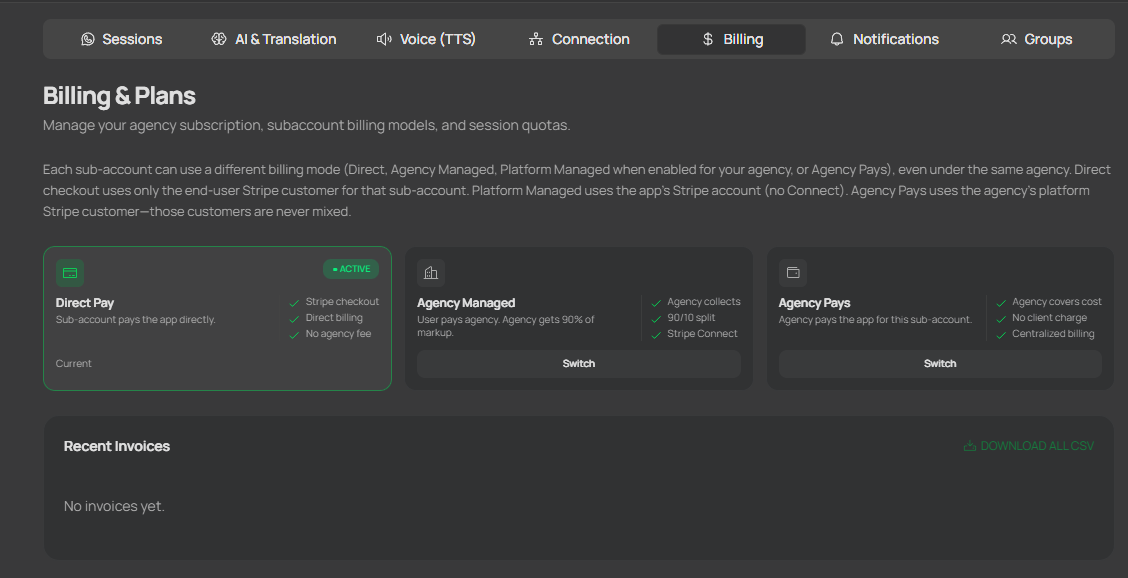
Illustrative view of the Billing section on a sub-account: billing mode, subscription state, and payment actions based on permissions.
What you usually do on this tab
- Check the effective billing mode (inherited vs overridden).
- Open the payment provider portal when the action is available.
- Review subscription status and payment history.
- Request or apply cancellation at period end when shown in your plan state.
- For eligible roles, toggle free session creation for that sub-account.
Payments and verification
If the system asks you to complete details with the payment provider (e.g. card or identity verification), use only the official links shown in the app.
Common misunderstandings
- Different modes across sub-accounts are normal when overrides exist.
- Not every user can edit billing; many accounts are read-only.
- Cancellation often takes effect at period end, not immediately.
Related
- Sessions — first session free period and extra paid sessions.